Introduction
The OSI model is a seven-layer reference model used to describe network communication as a set of separate responsibilities. It does not mean that every real protocol stack is implemented as seven independent software modules. Its value is that it gives engineers, students, and support teams a shared vocabulary for asking where a problem or function belongs.
Layered view
Separate physical transmission, local delivery, routing, transport, and application behavior instead of treating networking as one block.
Troubleshooting
Check the lowest likely dependency first: link, addressing, routing, transport, name resolution, and finally the application.
Bridge to TCP/IP
The Internet protocol suite uses a different grouping, but the two models can be mapped approximately for learning and diagnosis.
What is the OSI model?
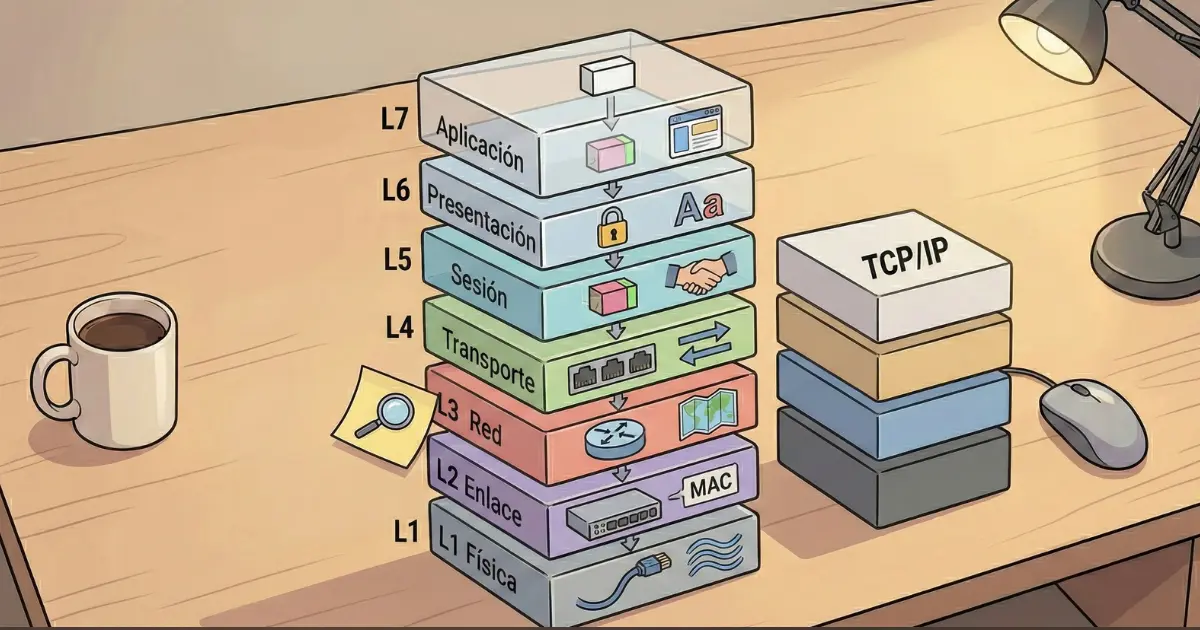
OSI stands for Open Systems Interconnection. The model divides communication into seven conceptual layers, from the physical transmission of bits to application-facing network services. Each layer provides a service to the layer above and relies on functions below it.
Main characteristics of the OSI model
- It is a reference model, not a single protocol.
- It separates responsibilities so technologies can be discussed independently.
- It helps compare protocols from different vendors and eras.
- It is especially useful for documentation, teaching, and troubleshooting.
Quick OSI review
- Layer 7 – Application: network services used by applications, such as HTTP, DNS, SMTP, and SSH.
- Layer 6 – Presentation: representation, encoding, serialization, compression, and cryptographic transformations.
- Layer 5 – Session: coordination and lifecycle of conversations in the conceptual OSI model.
- Layer 4 – Transport: end-to-end transport with protocols such as TCP and UDP, including ports.
- Layer 3 – Network: logical addressing and routing, primarily IP.
- Layer 2 – Data Link: local-link delivery, frames, MAC addressing, Ethernet switching, and VLANs.
- Layer 1 – Physical: signals, connectors, media, radio, timing, and bit transmission.
The seven OSI layers
Physical (L1) defines how bits are represented on copper, fiber, or radio. A disconnected cable, damaged fiber, disabled interface, or severe wireless interference belongs here.
Data Link (L2) provides delivery across a local link. Ethernet frames, MAC addresses, switching, VLAN tags, and spanning-tree behavior are common examples.
Network (L3) introduces logical addressing and forwarding between networks. IPv4, IPv6, routing tables, prefixes, and routers belong to this layer.
Transport (L4) identifies application conversations with ports and provides transport behavior. TCP adds reliability, ordering, flow control, and congestion control; UDP provides a lightweight datagram service.
Session, Presentation, and Application (L5–L7) describe higher-level coordination, data representation, and application-facing services. In modern TCP/IP practice these responsibilities are often implemented together inside applications and libraries rather than exposed as three clean layers.
Encapsulation and data flow
What is encapsulation?
As application data moves down the stack, each layer adds the information it needs. A transport protocol adds a TCP or UDP header; IP adds source and destination addresses; Ethernet adds local-link addresses and frame information. At the receiver, the process is reversed.
Protocol data units (PDUs)
The common teaching terms are data at the upper layers, segment for TCP or datagram for UDP, packet at IP, frame at the data-link layer, and bits at the physical layer. Terminology can vary by context, but the layered idea remains the same.
How OSI relates to the TCP/IP model
The TCP/IP model reflects the Internet protocol suite more directly. A common four-layer view groups Application, Transport, Internet, and Link/Network Access. The mapping is approximate rather than exact.
Approximate equivalence
- OSI 7–5 → TCP/IP Application
- OSI 4 → TCP/IP Transport
- OSI 3 → TCP/IP Internet
- OSI 2–1 → TCP/IP Link or Network Access
Use OSI when you need fine-grained vocabulary and TCP/IP when you want a model that follows the deployed Internet stack more closely.
Practical uses of the OSI model
Troubleshooting
If a workstation cannot open a website, start by checking whether the interface is up and connected. Then verify IP configuration and the default gateway, test reachability, check DNS resolution, inspect TCP connectivity, and only then focus on the browser or application. This prevents random troubleshooting.
Example: opening a website
The browser uses an application protocol such as HTTPS. DNS may resolve the hostname. TCP or QUIC provides transport behavior. IP routes packets toward the destination. Ethernet or Wi-Fi carries each hop locally. Physical media or radio moves the bits. Each hop may change the Layer 2 frame while the end-to-end IP conversation continues.
Design and security
Layered thinking helps place controls correctly. Port security and 802.1X operate near the access edge; ACLs filter Layer 3/4 information; stateful firewalls track flows; TLS protects application data. A single security control does not replace every other layer.
Frequently asked questions
Is the OSI model still useful?
Yes. It remains a practical vocabulary for design, education, and troubleshooting even though the Internet itself is built around the TCP/IP protocol suite.
Are the seven layers visible as separate programs?
Not necessarily. Real operating systems and applications often combine responsibilities that the model separates conceptually.
Which layer is Ethernet?
Ethernet spans data-link functions and physical specifications, so it is commonly discussed across Layers 2 and 1.
Which layer is IP?
IP is the central Layer 3 protocol in the TCP/IP suite.
Conclusion
The OSI model is most valuable as a map. It tells you which responsibility you are looking at and prevents concepts such as MAC addressing, IP routing, TCP ports, and DNS from being mixed together.
Next step
Continue with Ethernet, network protocols, and TCP vs UDP to turn the layer model into concrete protocol behavior.