Introduction
Networks work because independent systems agree on rules for addressing, framing, transport, naming, routing, security, and application behavior. Those rules are expressed through protocols. A protocol defines message formats, expected behavior, and how devices react to specific events.
You do not need to memorize every protocol at once. A better approach is to understand which layer and problem each protocol belongs to, then learn the details when you use it.
What are network protocols?
A network protocol is a set of rules that lets two or more systems exchange information predictably. The rules may define headers, fields, timers, state machines, error handling, authentication, or how peers discover each other.
Why protocols matter
Without agreed rules, one vendor's device would not know how to interpret another vendor's traffic. Standards and interoperable implementations allow heterogeneous networks to communicate.
Interoperability
Ethernet, IP, TCP, DNS, and many other widely implemented standards let equipment from different manufacturers participate in the same network.
Standardization
Organizations such as the IETF and IEEE publish specifications that define Internet and LAN technologies. Vendors may also implement proprietary protocols where standard alternatives do not exist or where additional features are required.
Modularity
Layering lets one protocol evolve without redesigning every other part of the stack. HTTP can run over different transports; IP can run over Ethernet, Wi-Fi, or other links.
Scalability
Hierarchical addressing, routing protocols, and distributed systems such as DNS allow networks to grow far beyond one local segment.
Security
Protocols such as TLS, IPsec, SSH, 802.1X, RADIUS, and TACACS+ add confidentiality, integrity, authentication, or access control to different parts of the architecture.
The TCP/IP model
The TCP/IP protocol suite is the foundation of the Internet. A common four-layer model groups networking into Link, Internet, Transport, and Application responsibilities.
The four TCP/IP layers
- Link: Ethernet, Wi-Fi, and local-link delivery.
- Internet: IPv4, IPv6, and ICMP, with routing between networks.
- Transport: TCP and UDP, plus modern transports built over UDP such as QUIC.
- Application: DNS, HTTP, DHCP, SSH, SMTP, NTP, SNMP, and many more.
Comparison with OSI
The OSI model uses seven conceptual layers, while TCP/IP groups several upper-layer functions together. Use the OSI and TCP/IP guide for a detailed mapping.
TCP vs UDP: differences and use cases
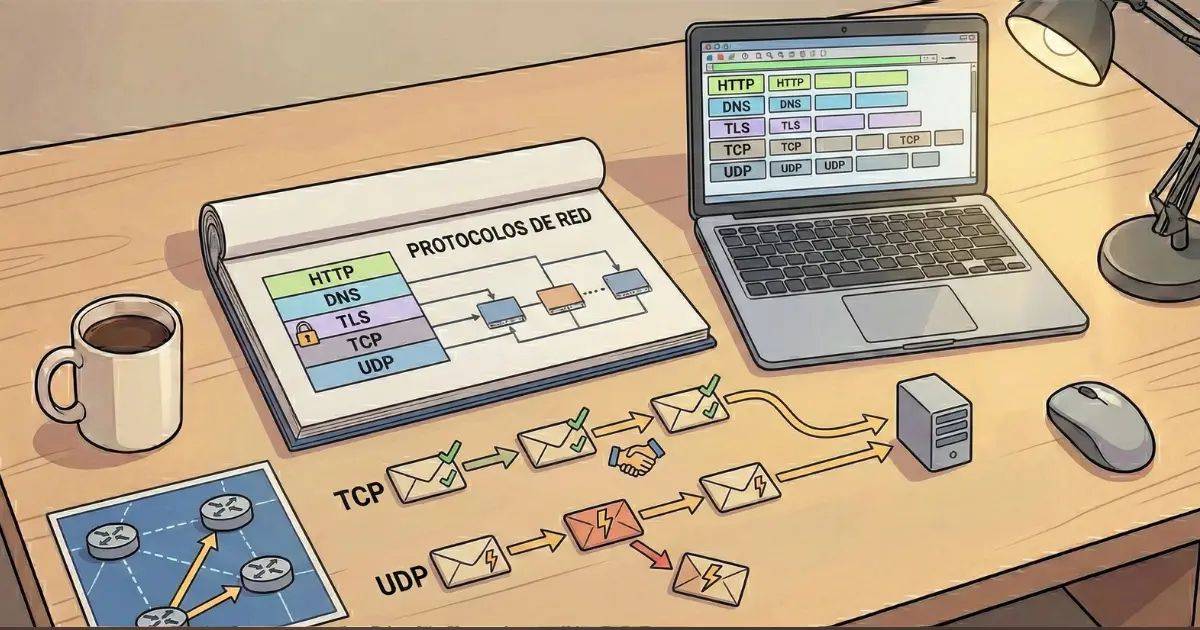
TCP provides a reliable ordered byte stream with connection state, acknowledgements, retransmission, flow control, and congestion control. UDP sends independent datagrams with minimal transport overhead and no built-in reliability.
Quick comparison
- Web traffic can use TCP with HTTP/1.1 or HTTP/2, while HTTP/3 uses QUIC over UDP.
- DNS often uses UDP for ordinary queries and TCP in cases that require it.
- SSH uses TCP because an interactive session needs reliable ordered delivery.
- Real-time media may use UDP when late retransmitted data would be less useful than fresh data.
See TCP vs UDP for the transport details.
Common ports: a quick table
| Service | Typical port | Transport |
|---|---|---|
| SSH | 22 | TCP |
| DNS | 53 | UDP/TCP |
| DHCP server/client | 67/68 | UDP |
| HTTP | 80 | TCP |
| HTTPS | 443 | TCP; HTTP/3 commonly QUIC/UDP |
| NTP | 123 | UDP |
| SNMP | 161/162 | UDP commonly |
Ports are defaults and conventions, not immutable laws. Applications can listen on different ports, and a port number alone does not identify whether traffic is legitimate.
Application-layer protocols
DNS maps names to data such as IP addresses and other records. DHCP automates host configuration. HTTP/HTTPS transports web application data, with TLS providing encryption and authentication for HTTPS. SSH provides secure remote access. SMTP moves email between systems, while IMAP or POP can be used by mail clients. NTP synchronizes time, which is critical for logs and authentication.
Application protocols depend on lower layers, so a "DNS problem" may actually originate in routing, firewall policy, or transport reachability.
Routing protocols
Routers can use static routes, but larger networks use dynamic routing protocols to exchange reachability information and react to topology changes.
Main IGP families
OSPF and IS-IS are link-state IGPs used inside an administrative domain. RIP is historically important but limited for modern large designs. EIGRP is associated mainly with Cisco environments.
EGP
BGP is the protocol used to exchange routes between autonomous systems and is fundamental to Internet routing. It is policy-oriented and differs substantially from a campus IGP such as OSPF.
Security protocols and controls
TLS protects application sessions such as HTTPS. IPsec can protect IP traffic through authentication and encryption. SSH replaces insecure remote shells. 802.1X controls network access at the edge, commonly with RADIUS. VPN technologies combine tunneling, authentication, and encryption to connect users or sites securely.
Security is layered: encryption does not replace segmentation, ACLs, stateful firewalls, identity controls, or secure device configuration.
Emerging protocols and trends
QUIC moves important transport functions into user space over UDP and is used by HTTP/3. Encrypted DNS transports such as DoH and DoT change how DNS traffic appears to networks. IPv6 adoption continues to reduce dependence on address conservation techniques, while automation APIs and model-driven interfaces change how infrastructure is managed.
The important skill is not memorizing every new acronym. Learn the purpose, layer, state model, security properties, and operational impact of each protocol.
Frequently asked questions about network protocols
Is TCP/IP one protocol?
No. It is a suite of protocols and a model built around technologies such as IP, TCP, UDP, ICMP, and application protocols.
Does HTTPS use a different port from HTTP?
By convention HTTP uses 80 and HTTPS uses 443, but services can be configured on other ports.
Is UDP always faster than TCP?
UDP has a smaller transport contract, but application performance depends on loss, latency, congestion control, and what reliability the application must implement itself.
Which protocol chooses the route?
Routing protocols help routers build routing information, while each router forwards packets according to its own forwarding table and longest-prefix matching.
Additional resources
Use the focused SubnetMaster guides for TCP and UDP, ICMP, Ethernet, MAC/ARP, and the OSI/TCP-IP models. Later clusters cover routing, services, troubleshooting, and security in depth.
Conclusion
Protocols are easier to learn when you group them by purpose. Ethernet moves frames locally, IP provides routable addressing, TCP/UDP identify application conversations, routing protocols distribute reachability, and application protocols deliver user-facing services. Security protocols protect those exchanges at different layers.
Next step
Continue with TCP vs UDP and ICMP, then connect them to IP addressing and subnetting.